 Owlex
OwlexAny image, as a sharp SVG.
Owlex SVG turns logos, icons, drawings and photos into clean vector shapes you can scale to any size — right on your Android phone. Nothing is uploaded: there isn't even an internet permission.
How it works
A logo becomes a vector in moments. Pictures with many colors take a few seconds more.
Pick an image
From your gallery or the camera — or share it to Owlex SVG from any app: a browser, a chat, a file manager.
Tune the result
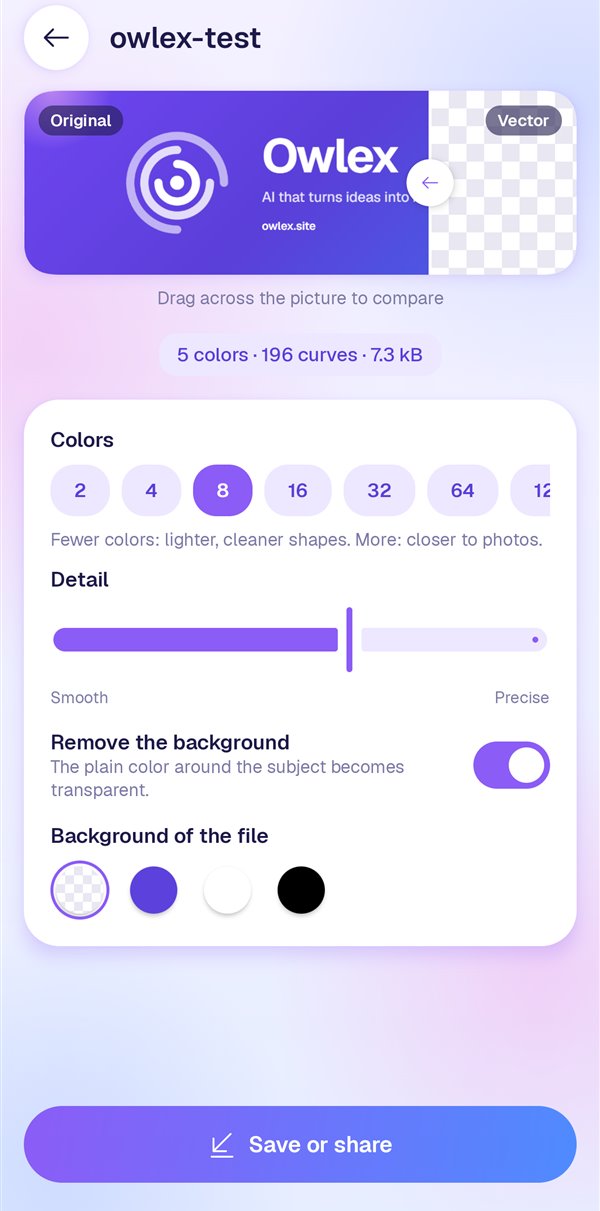
Drag across the picture to compare the original with the vector. Choose how many colors to keep, how closely to follow the pixels, and whether to remove the background.
Save or share
As SVG for the web and design tools, as an Android vector for app projects, or as a PNG at any size up to 4096 px.
What it does
Private by design
Tracing runs on the phone's own processor. The app has no internet permission, so your images can't leave it.
Before and after
The original and the vector on one picture, split by a line you drag — see exactly what changed.
2 to 256 colors
Few colors for clean logos and icons, many for illustrations and photos. Brand colors stay exact.
Background removal
The plain color around the subject becomes transparent — or save on white, black or the original color.
Three formats
SVG for Figma, Illustrator, Inkscape, Canva and the web; VectorDrawable XML for Android; sharp PNGs at any size. Or copy the SVG code.
Your history
Every conversion is kept with its settings, so you can come back and change it later.
Questions
Which images work best?
Logos, icons, drawings, stickers and illustrations with clear shapes give the cleanest results. Photos work too: they become a stylized, poster-like vector — use more colors and more detail to stay close to the original.
Does it upload my images?
No. Everything happens on your phone, and the app doesn't have the internet permission at all. Your conversions stay in the app's private storage until you delete them.
What is the Android XML file for?
It's a VectorDrawable: drop it into an Android project's res/drawable folder and use it as an icon or illustration that stays sharp on every screen.
Is it related to Owlex Builder?
Yes. It grew out of Owlex Builder's icon studio, which turns a picture into an app's launcher icon. Owlex SVG makes that tracing engine a tool of its own.
Be first to try it.
Owlex SVG is coming to Google Play. Leave a one-line email and we'll tell you the day it's out.